
 paragonrp.gg
 Join our Discord
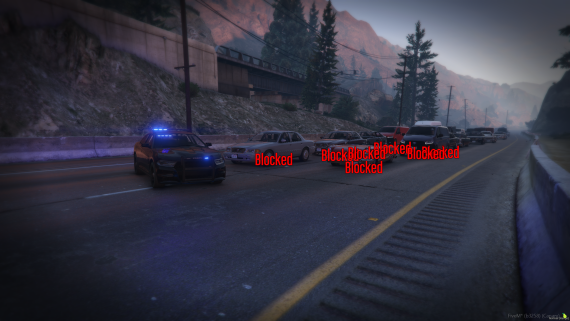
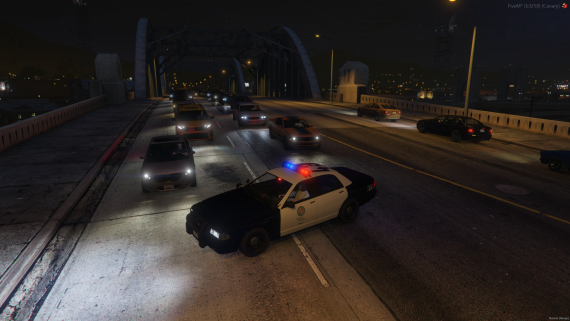
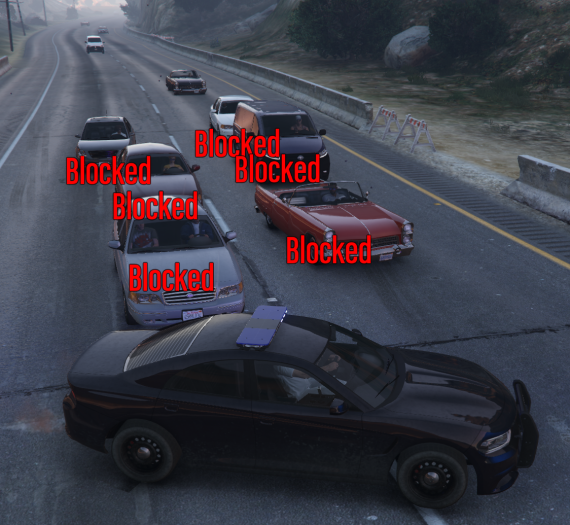
Block traffic as nature intended with the width of your vehicle!
The red text "Blocked" in some screenshots is not visible and is to show the action taking place.
Paragon Traffic — Realistic Emergency Traffic Control for FiveM
Bring realism to your emergency scenes with Paragon Traffic. This lightweight system lets emergency vehicles naturally block and control AI traffic using their sirens and airhorns — no clunky menus, no chaos, just immersive traffic behavior that reacts to your presence.
Overview
Paragon Traffic automatically stops nearby AI vehicles when emergency sirens are active, simulating real-world traffic control. Use your vehicle’s size and positioning to manage intersections, accidents, or emergency scenes — just like real responders do.
Features
• Automatic Traffic Blocking — AI vehicles stop when emergency vehicles are near
• Siren Detection — Real-time monitoring of sirens to trigger traffic control
• Airhorn Enhancement — Increases range and reaction time for faster response
• Configurable Modes — Choose between Siren mode or Allowlist mode
• Speed Thresholds — Only slow-moving vehicles trigger traffic stops
• Pedestrian Control — Calms nearby pedestrians during emergencies
• Vehicle Allowlist / Blacklist — Fine-tune which vehicles can control traffic
• Real-time Debugging — Visualize blocked vehicles with debug mode
Requirements
ox_lib
Installation
Place the folder paragontraffic inside your server’s
resourcesdirectory.Add the following lines to your server.cfg:
ensure ox_lib
ensure paragontraffic
Configuration
All settings can be found in data/config.lua
Core Options:
• Enable or disable traffic blocking
• Choose between "siren" or "allowlist" modes
• Adjust update frequency and performance settings
Vehicle Control:
• Allow or blacklist specific vehicle models
• Option to let unmanned emergency vehicles block traffic
Traffic Behavior:
• Calm pedestrians near emergency vehicles
• Customize reactions for non-emergency sirens (turn, stop, ignore)
Distance and Speed:
• Choose mph or km/h
• Set the range and speed threshold for blocking AI traffic
Airhorn Options:
• Extend range and ignore speed limits while using the airhorn
• Adjust distance and obedience settings for blocked vehicles
How It Works
Siren Mode (Recommended):
• Vehicles with active sirens automatically trigger AI traffic control
• Works for all emergency vehicles out of the box
Allowlist Mode:
• Only specific vehicles listed in the allowlist can control traffic
• Ideal for custom emergency models
Traffic Blocking Process:
Activate siren in an emergency vehicle
System checks your speed (below threshold)
AI vehicles within range stop
Pedestrians calm down if enabled
Traffic resumes once the siren stops or vehicle moves away
Airhorn Enhancement:
• Press your horn for instant extended-range control
• Perfect for intersections or emergency crossings
Performance Notes
• Server checks run every 5 seconds by default (configurable)
• Lightweight and optimized for minimal client load
• Airhorn detection runs in real-time
Quick Test Checklist
• Start your server; confirm paragontraffic starts after dependencies
• Spawn an emergency vehicle
• Activate siren and approach AI traffic slowly
• Verify AI stops and pedestrians calm
• Test airhorn for enhanced range
Support
Need help or have a feature idea?
Join the Paragon Discord: discord.gg/paragonrp
Tags:
fivem traffic control, fivem emergency script, qbx core, ox lib, fivem realism, fivem ai traffic, gta rp traffic, fivem police tools, fivem ambulance, fivem development, paragon scripts